Wednesday, November 13, 2013

The death of the iPod dock

Gone are the days you need to dock something to get music from it! Bluetooth  docks are the way to go.
I was helping a neighbor get surround sound from his iPhone a few weeks ago, I tried anyway. Dug out my trusty KEF iPod Dock that I purchased on a really good deal a few years ago. If you don't know KEF, they are an audiophile speaker company from the UK. The entire case of the speakers are metal! Anyway, let me get back to my story, took it over, plugged in all the wires (old clunky system, has more wires than the unit itself!). Docked an iPhone 4S (note: not even an iPhone 5). BAM! The apple'a version on BSOD, blue screen of death, "This accessory is not compatible with this Apple product". Nothing really to do beyond this...
This got me thinking, we all probably have an iPod Dock of some sort, like a clock radio, speaker system, cable with the receiver system etc. but Apple has made some suttle changes to the 30 pin connector in recent versions of their products and of course the new lightning connector! I quickly see every accessory in my house starting to become extinct. Well, as long as I keep my old apple products in working condition.
Sooooo, if you are considering to get an iPod Dock speaker system, don't!!!! Just stick to Bluetooth. The new wave of speaker systems like the Bose Soundlink II, Jawbone Jambox, Logitech UE boom box etc. are completely wireless. This means, no more docks and the phone or tablet or even laptop does not have to be next to the unit. You can"stream" it via Bluetooth. Using bluetooth also makes it easier to connect non-apple products (in the past you couldn't "dock" these), like android phones or tablets. You lucky Samsung owners can benefit from having music surround :-). Worh clarifying on thing, you can stream music from a tablet or phone or even a laptop that is BT ready.
A few things to consider whe choosing the type of portable speakers:
1. Size
2. Sound quality (smaller they are the less bass in the sound) - this is just a rule of thumb, some out there are great and small!
3. Battery life. Since they are portable, you want to be able to take the anywhere and play it without having to plug it into the wall.
4. Weight (goes with the portability comment!).
5. Compatibility should be Bluetooth, these are fairly standard. There is a slight chance that the BT versions change in time (very slowly in time), but I think you are ok for the next few years, but these Bluetooth protocols won't change hence you can always stream the music via this method.
6. Apple AirPlay, this is their own protocol that allows more control on iTunes wirelessly and helps with streaming across wifi. 

The next wave of connected decides will probably be wifi based (router and direct).  But until the protocols are defined and agreed upon, I think it will be a few years before we see true adoption across manufacturers.

I suggest taking the time to read reviews and also listen to the products at a store before buying. Personally, I have the older Bose sound dock and love the sound. The future will probably be the soundlink (note the dock name changed to link :-)).

If you have a favorite model that you are happy with, leave a comment so others can benefit from your experiences!

-Kannan


Tuesday, November 12, 2013

Are mobile payments becoming commonplace?

Unlike my friend Kannan who has a new baby at home keeping him busy, I have no excuse for such a long absence from this blog post. I am just plain lazy :)

I did write a blog for the Retail Touchpoints magazine on the topic of mobile payments and how it can become reality as part of my day job, so i thought why not share it on this tech blog :)

That post went live a week or so ago online at


Check it out and add to it with your comments!

Cheers
-Ram

Thursday, October 24, 2013

"XBOX", please make me a cup of tea...

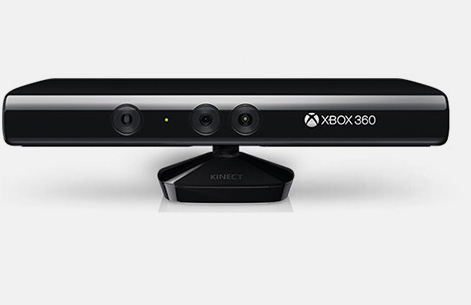
Ok, Ok, my xbox can't make me a cup of tea (yet!). I recently came across a nifty feature of xbox+kinect PLUS voice command capability. This combo translates to a fully handsfree REMOTE!

First I wanted to apologize for being absent for almost 3 weeks now....we had a baby! Everyone is doing well and finally I am getting back to reality.

So, when I was looking at putting a TV in our bedroom for my breastfeeding wife who will probably spend 80% of her time for the next few months in the room, I had planned on putting an old laptop rigged up with wifi, HDMI and optical out for audio. Remember, we don't have cable TV, so I need the laptop to stream video (live TV with Mohu Leaf wasn't going to work at 3am!). This worked, but a huge mess with wires and remotes and having to use a mouse to run the laptop etc. I think my wife would just be better off with a kindle...

Then BAM! I remembered I had an XBOX 360 in the living room (from this comment, I think you can guess when was the last time I used the XBOX). ANYWAY, I vaguely remember reading somewhere that the xbox can stream hulu, netflix a few other online sites. I also had a XBOX live membershop card that wasn't activated :-)
I hooked everything up in the bedroom, turned out quite neat since there are minimal wires (just HDMI to the TV) and Kinect wires are hidden behind the TV anyway. Booted it up, spent the next 45 minutes logging in, getting setup with a live account, updates etc.With Kinect, you can use hand gestures, which worked just OK for me, maybe the lighting in the room wasn't enough or something, but also not truly "handsfree" since you still have to use your hands. While fiddling with the xbox software, I found a neat little feature called "VOICE COMMANDS". You just say "XBOX" and it wakes up and asks for more commands. It gives you a choice of certain letters and words to use which are highlighted on the screen. You can then say things like "Apps", "Hulu" and best part is that the commands work inside the apps as well. You can say things like, "Shows I watch", "Greys Anatomy", "Play most recent" etc....

And why is the useful? Well, if you are carrying, handling, rocking, feeding a newborn, the last thing you want to do is fiddle with a handheld remote. I think this is a great way to automate an age old problem of using remotes. Of course, some newer TVs have similar features built in, but who wants to spend $2000 on a new top end TV? If you have an XBOX 360+Kinect, just need to get the Live membership (obviously not free!) and start using your voice!

PS: Once my wife started using this in the last few weeks...her words "One of the best ideas you have had!". So, there you have it, proven and approved by a mother (and most importantly my wife!).

Love to hear what other nifty ideas you have to help new mothers, leave a comment!

-Kannan


Friday, September 27, 2013

Home health monitoring in the smartphone age - Not upto par......

I am a "diagnosed diabetic" for almost 10 years now and have used many blood glucose meters and a couple of blood pressure meters to keep track of my vitals to help manage my health. The first time i went to see the doctor after being diagnosed with diabetes with a colorful chart, the doctor was surprised and said I was the first of his patients to do this. That was the honeymoon phase right after being diagnosed when I was serious about controlling it. It has been an up an down battle since then. What i had to do was take the measurements on the blood glucose (here after BG) and blood pressure (here after BP) meters and then once a week would enter into an excel file and then plot it to see the high lows and the average. This was helpful in my follow up discussions with the doctor. did that the first 2-3 visits and then stopped as i kept forgetting to input them into excel. There were some meters out there that had an audio out jack that allowed you to connect to a Windows PC the meter and download the data using special software.

Being a techie, i could not believe this. Seems hard to believe we didn't have something easier. But looking back I realize this was 2003-2004 I am talking about (seems like eons ago before the smartphone era with cool apps, doesn't it?).

Back in early 2012 i found an app aptly named "BloodSugar" by healthycloud that i have been using to input my readings. This app is cool and allows you to see your history as a table and as a chart that i have been showing to my doctor during recent visits. Also found a BP app called "BPMonitor" by Taconicys that is similar with tables and charts to see historical data.

    
But the funny part is that even after so many years of smart phones being around, the big bad pharma companies have not come out with meters that either talk to a phone over Bluetooth or NFC or a meter that just attaches to the smartphone as a dock! Well one small company has. This BG meter that connects to the iPhone is called iBGStar. I can't wait to try it out. I just found out about it. There is also a "MyGlucohealth" BG meter with Bluetooth that is out there but there are concerns about the accuracy of it's readings.

Hoping that the more popular brands like AccuChek (Roche), Bayer, Freestyle (Abbott) would not have bluetooth enabled meters. Roche has a bluetooth controlled insulin delivery tool but not a meter. Go figure.

I prefer the Bluetooth enabled meters in place of the dock-able ones as the connectors in every phone seems to be different.

Please share if you are aware of meters available in the market that are up to par for automated tracking!!!

Cheers to everyone's good health and staying healthy
-Ram

Saturday, September 21, 2013

What? More monitors???

Baby #2 is almost here, so as you can image, I've been spending a lot of time getting prepped. It is amazing how fast you forget things. Ram and I seem to have an obsession to cut cords and monitor things remotely :-)

I will make this one short, do you need a baby monitor? Answer: Yes. Do you need one that has a camera? Answer: Yes. Why with camera? Because you can and since technology has really taken root in this nifty gadget.


I do believe they are quite pricey, but there are just too many options. I kinda tripped over one when our first son was born. It was by a brand called Levana. I forget how I found it, but glad I did. Some typical features I suggest looking for:
1. IR capable so that you can see images at night
2. Digital wireless connection (for privacy)
3. 2.4in or larger screen on the receiver
4. Easy mount for the camera incase you need to clip it to a bookshelf.
5. VOX (See below)- Levana's charm!
6. Temperature monitor


The most nifty feature is the VOX feature (at least that's what they call it). It is a feature that will only turn on the screen if the sound is sharp and loud. So, when the baby is turning around, breathing heavy, slight ruffles etc, NOTHING happens. You may think this is what you need to hear, trust me, you don't! You want the system to engage with the child screams, starts talking, falls off the bed etc! I have only found this feature in Levana products (BabyView20 and Jena). I still have the BabyView20 (had it for 3 years) and just upgraded to Jena with two camera for Baby #2. Quality is ok, had to get a few Babyview20 replaced on warranty due to usage issues, but I really like the product, particularly for this VOX feature, which is also called PEEP. And key feature to note, it is multi-voltage, we take it along wherever we are going...UK, Malaysia etc.

Anyway, I am probably rambling now, just getting ready for the sleepless nights coming up. If you have any suggestions for better monitors, please leave a comment! I am sure others would like to hear your stories!

-Kannan


Saturday, September 14, 2013

Open Sesame....

I am a hardcore apple fan and as expected was online following the latest Apple iPhone 5s event on CNET the other day. As was rumored the iPhone 5S does include fingerprint technology called TouchID, similar to the one I wrote about in the Ding Dong article earlier. Fingerprint has been the way of identifying people from the prehistoric ages....see this article online for a history about fingerprints - http://onin.com/fp/fphistory.html or read chapter 1 of this book http://www.nij.gov/pubs-sum/225320.htm by the National Institute of Justice (kindle or other eReader versions available for free).


The objective of apple is to help speed up things - basically eliminate entering passwords the umpteen times you access your phone in a day. Just place your finger on the home button and voila - open sesame! That is convenience at its best combined with security. This maybe the beginning of the end of passwords and pass codes if other smartphone manufacturers follow suit which I strongly believe they will.

Take for example the point and shoot camera that are slowly vanishing given the quality of pictures on most smartphones getting better by the day and the convenience of taking pictures with a phone instead of carrying a second device in your pocket. Or the home phone for that matter is slowly fading away.......

Best of all is that this could be the beginning of true mobile wallets for mobile payments eliminating the need for credit cards someday.  Given Apple has talked about using the TouchID for iTunes and app store purchases, I believe this will surely be followed by combining Passbook app with TouchID for quick online purchases  and may be even offline at the retail stores. Combined with blue tooth technology in iPhone or NFC in other phones (like the Fujitsu Regza phones in Japan), placing your finger on the fingerprint sensor can approve payments to a credit card terminal at the checkout lane at the retail or grocery stores. This way next time you go out all you would need is your phone and your drivers license for ID.

Maybe the day is not far when the phone with fingerprint sensor on it is your proof of ID :)

On a historical note, Apple is not the first company to put a fingerprint sensor on a phone. Siemens (Germany) and Sagem (France) experimented with sensors on phones back in 1998 and 2000 respectively but it was Fujitsu of Japan that came out with the commercially successful clam shell (flip) phones that had fingerprint sensors on them in 2003. Fujitsu is the only phone company that has built the most models (30) with fingerprint sensors on them. The japanese already use phones extensively to make mobile payments for purchases at vending machines and at stores. Motorola (Google now) and Fujitsu both announced Android phones back in 2011 with fingerprint sensor. The Motorola Atrix model did not take off and was discontinued but Fujitsu has had some success limited to Japan.

F505i
Fujitsu F505i - with fingerprint sensor released in 2003                                                          

Now let's wait and watch if the magic of Apple can make this commonplace the world over......or will it  also end up on the heap of cool but discarded technology pile.

Cheers
-Ram

Wednesday, September 11, 2013

Cut the cord (again!)

WiFi for the home is an important feature of any household these days. But how should you set this up? There are probably a million ways to setup a home network. Here are my $0.02 on how I would go about it.

First things first, 802.11AC, this is the 5th gen WiFi protocol. I think this is needed, but 2-3 years down the road, UNLESS you are moving a LOT of data inside your home network (trust me, you are NOT doing this today!). Remember, if you chose 802.11AC, both the router and laptop/PC must support this.


Okay, now on to more "regular" WiFi. A couple of key features you should check out before getting a new router, simultaneous dual band and 802.11n. Dual band means, the router can operate on the 2.4GHz band AND the 5.0GHz band. This is critical to understand since now you can have two wireless networks in the house, running at different frequencies. 802.11 b/g runs at 2.4Ghz which is shared with your microwave oven, Bluetooth, some cordless phones, baby monitors etc. And 802.11a /n runs at 5GHz which has less interference, so it is cleaner and able to sustain the fastest speeds. When you have interference, you may not lose the connection, but it becomes significantly slower and FRUSTRATING!


If you recall my blog on cutting the cable cord for TV, I now use my internet for TV viewing. I noticed the dreaded "loading" icon on my TV when I was trying to watch TV. I started to play around my router setups and dedicated a 5GHz network for my high bandwidth systems, TV, ipad and work laptop :-). I then put all other devices on a regular 2.4GHz network, like phones, ipod touch, audio streaming, webcams etc. I've noticed significant improvement in my TV viewing experience!

Of course, true internet speeds and bandwidth is determined by your internet connection, so WiFi data speeds are probably not a bottle neck but can be if you have good internet speed. I did some testing to see how these things are related. Here is an example:

My internet speed on AT&T UVerse (fibre to the curb) is 18Mbps based on what AT&T tells me (or robs me). When I perform speed tests using my 2.4GHz network, I get 12-13Mpbs and when I use the 5GHz network, I get 17.5Mbps. This clearly indicates to me, if I have internet speeds more than 13Mbps, the WiFi network is my bottleneck! But I should quantify that for normal internet browsing etc. 12Mbps is more than enough.

How did I setup my home network? Well, I am kinda cheap (for those who know me well), I have an Apple Extreme base-station from 2008. Apple is typically ahead of the curve, so I had a dual band router (but not simultaneous). I can't run 5GHz and 2.4GHz at the same time.... Then I realized I had a WiFi router built into my AT&T modem (that can ONLY run 2.4GHz). Then it hit me!!!! I now run a 5GHz network using the Apple router and 2.4GHz using the AT&T router. And you can put them next to each other since they are running two different frequencies, there is little degradation to the signal. The EASIEST way to get this going if you have a router more than 3-4 years old, is to just get a new dual band (simultaneous router). I recommend the Apple router/base station family. I have used many brands in the past. Seems like they all have their quirks. I've been the most happy with my Apple router. It just works and you never have to re-boot it. As common practice, I also recommend re-booting any router from time to time.

For some reason, in Malaysia, seems like modems wear out faster, maybe the heat and dust, I do recommend changing/replacing the router every 2-3 years, obviously only if they are the cheap ones. It would hurt to keep changing the Apple router that often!

As an added bonus, if you get the latest Apple router, it is 802.11AC ready, which is the next generation 600Mbps speed!

Leave me a comment if you have additional questions on this topic, would be glad to help.

adios,
Kannan